A transmission control module OEM number lookup starts by identifying what the number represents. A label may show hardware, software and serial references, while a parts catalogue may list a separate service part or replacement kit. Searching the wrong field can lead to a convincing but irrelevant result.
Record the complete reference and its source, then check it against the vehicle and installed transmission. This guide helps workshops and parts buyers compare those records before choosing a replacement.
Identify What Each Number Refers To
Do not treat every number on a controller or scan report as an orderable part number. First identify the field name and the object it describes. The same report can contain several useful references without telling you which one a supplier needs for a replacement.
| Reference type | What it identifies | How to use it in a parts enquiry |
|---|---|---|
| Service or order number | The catalogue item supplied as a part or kit | Ask which components the order item includes and which application the catalogue assigns to it. |
| Hardware part number or revision | The controller hardware or its design revision | Record it as a hardware reference; ask how it maps to the listed replacement. |
| Software part number, calibration ID or version | The software identified by the diagnostic system | Keep it separate from the hardware number and include the field name shown by the tool. |
| Serial number | An individual unit | Keep it for identification and history; do not substitute it for the catalogue part reference. |
Field names and label layouts vary. A number described simply as “part number” on a scan screen may be a software reference. Preserve that wording and the surrounding fields rather than deciding from the number’s length or appearance.
A replacement kit can also have a different order number from the controller inside it. Ask the supplier to distinguish the number you found on the component from the number it intends to quote. That prevents a lookup from silently changing the scope of the purchase.
Build a Record From the Label and Diagnostic Readout
Build a small identification record before comparing listings. Keep the original evidence alongside your typed notes so the supplier or installer can check a character without starting the conversation again.
- Photograph the complete controller label in focus. Add a close view where small suffixes or revision fields are difficult to read.
- Copy the full reference, including its letter suffix. Preserve separators and spacing in the original record, even if a search engine accepts a condensed version.
- Save the diagnostic identification screen or report with the field names visible. Record hardware and software values on separate lines.
- Include the VIN, vehicle year and transmission code or identification plate details. State whether the transmission or controller has been replaced before.
- Label each entry by source: physical label, diagnostic readout, catalogue result or seller listing. Date the scan and note known software changes.
Do not guess an unclear character. Take another photograph from a different angle or ask the workshop to inspect the label when it is safely accessible. Keep uncertain text marked as uncertain in the enquiry; one guessed suffix can send the search toward a different item.
A photograph of the connector and housing can help the supplier understand what is fitted. Treat it as supporting information. Similar-looking housings do not establish that the electronics or software requirements match.
Use the VIN With a Parts Catalogue
Use the VIN to establish vehicle identity, then use an appropriate parts catalogue to investigate the replacement. The NHTSA VIN decoder provides vehicle information reported by manufacturers. It is useful for cross-checking vehicle details, but its vehicle decode should not be treated as a TCM order reference.
- Check that the VIN used in the enquiry belongs to the vehicle being repaired. Resolve transcription errors before comparing catalogue results.
- Ask the parts source to identify the catalogue application, including any required transmission, production-date or market selection.
- Compare the catalogue entry with the installed controller and transmission records. Tell the parts source about known replacements or conversions.
- Record the proposed order number, the catalogue description and any replacement notes together. Keep the date or reference of the lookup so it can be revisited.
If a different transmission has been fitted, the vehicle’s original build information may not describe every installed component. Give the workshop both sets of information. Ask it to establish the current assembly before the parts supplier selects a replacement controller.
The DSG and CVT controller guide provides background on controller and assembly types. For the actual order, keep the transmission identification with the VIN result; a broad vehicle model name leaves too much of the application unspecified.
Check an Exact Match or a Documented Replacement
A different number can be a valid replacement when the relevant catalogue or service information documents that relationship for the application. This is often called supersession. A similar sequence of digits, a newer-looking suffix or a seller’s broad compatibility list is not enough to establish that relationship.
| Lookup result | What to establish before choosing it |
|---|---|
| Exact reference appears on a listing | Confirm which field matches, which components are supplied and whether the listing applies to the installed assembly. |
| Catalogue gives a replacement part number | Ask for the original-to-replacement relationship, the vehicle or transmission selection, and any conditions attached to the replacement. |
| Diagnostic software number has a later version | Ask what software changed. A software update reference alone does not establish that different replacement hardware fits. |
| Controller number leads to a kit | Check the kit contents and whether the quoted order number covers the requested electronics or a larger assembly. |
Compare like references. A hardware number on the old unit and a software ID in a seller’s screenshot can differ without either record being incorrectly copied. They still do not form a hardware compatibility check until their roles are established.
Ask the supplier to state any programming or configuration conditions separately from the part substitution. A documented hardware replacement does not, by itself, describe the software state in which a used or prepared unit will arrive. Keep both answers with the quote.
Resolve Conflicting Lookup Results
When two results disagree, identify the specific conflict before searching more listings. Additional search results will not resolve a comparison between different reference types or a catalogue lookup based on the wrong transmission.
- Label differs from diagnostic readout: check the field names first. Ask whether the readout identifies installed software and whether programming has changed it since the label was printed.
- VIN catalogue differs from the fitted unit: recheck the vehicle selection, transmission identification and replacement history. Give both records to the workshop and parts source.
- Two sellers propose different numbers: ask each for the application and replacement relationship behind its quote, including any kit contents or setup conditions.
- One character remains unreadable: obtain a clearer physical record or a suitably identified diagnostic report. Do not turn the most common search result into a guessed label reading.
Illustrative lookup conflict
A workshop records a hardware reference from the controller label. A seller replies with a diagnostic screenshot showing a different software reference.
The useful next step is to request the seller’s hardware identification and order number, then compare the applicable catalogue records. Rejecting or accepting the unit from those two unlike numbers would leave the hardware question unanswered.
This is a hypothetical comparison, not a completed repair. If the application or substitution still cannot be established, pause the order and resolve that specific gap with the parts source.
Send a Parts Enquiry That Keeps the References Together
Send the identification record as one enquiry so the quoted part can be traced back to the same vehicle and installed assembly. Ask for the proposed order number and supply scope in the reply, especially when a supplier suggests a replacement reference.
- Vehicle and assembly: VIN, year, transmission code and known replacement history.
- Original controller: complete label photographs, transcribed reference and any unreadable field.
- Diagnostic identity: named hardware and software fields, with the scan date.
- Requested part: controller only or a larger assembly, condition and any proposed replacement number.
- Installation needs: the workshop’s programming requirements, requested quantity and delivery destination.
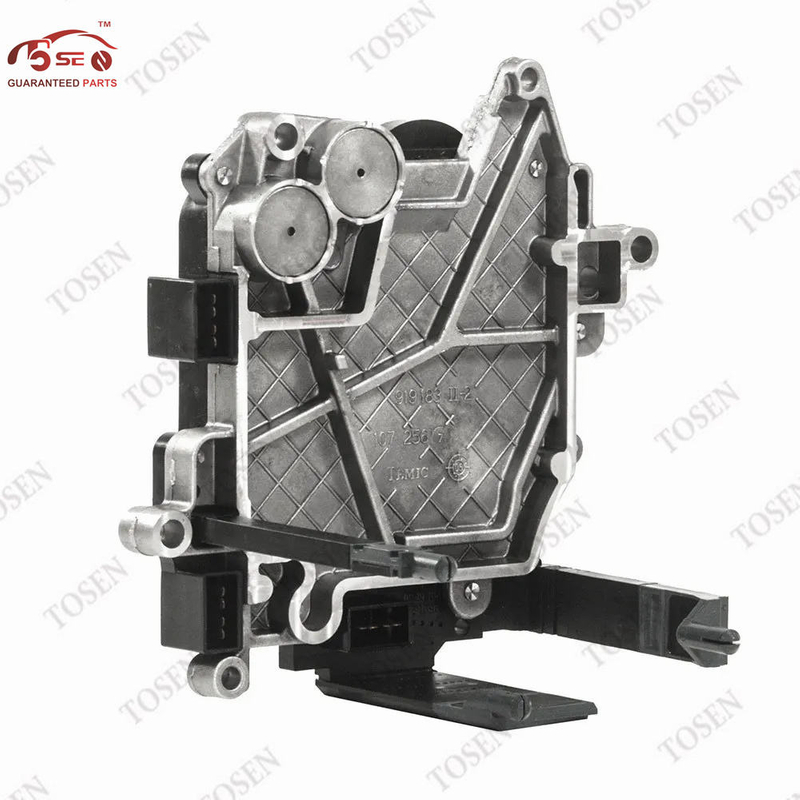
For example, TOSEN AUTO lists a 01J927156JG Multitronic transmission control module. Its product page asks buyers to match the original label and transmission code and provide vehicle and programming information. Use the full 01J927156JG reference in the enquiry; the example does not establish interchangeability with another suffix.
Browse the transmission control units catalogue once the required component type is clear. Ask which preparation, if any, is included with the quoted part and what work remains for the installer. Keep that answer separate from the number lookup so a correct parts reference is not mistaken for a promise of ready-to-run software.
Frequently Asked Questions
Can I identify the replacement from a barcode alone?
A barcode is another way of encoding information, not a guarantee that the result is an orderable part number. Keep the full label image and any readable text. Ask the parts source what the decoded value represents before using it as the replacement reference.
What if a used controller has already been programmed?
Ask for its current diagnostic identification as well as the physical label. Previous programming may affect the software identity. The label and current readout should remain separate records, and the installer must still assess the replacement’s hardware and setup requirements.
Is a marketplace vehicle-fitment result enough?
Treat it as a lead for further checking. Ask which exact part reference, transmission application and replacement relationship support the listing. Keep your original label and installed-transmission details in the enquiry, especially if the marketplace only asks for vehicle model and year.
Does a matching OEM number mean no programming is needed?
No. Number matching and software preparation are separate questions. Ask what software state the quoted unit will arrive in and have the installer identify any required programming, configuration or learning for that particular replacement.
Turn the Lookup Into a Clear Parts Request
Start with the reference type, preserve the complete number and check the application behind any proposed replacement. Resolve differences between hardware, software and catalogue records before committing to an order.
Request a TOSEN AUTO parts quote. Send the VIN, original controller label, transmission code and diagnostic identification fields, together with your required component scope, quantity and delivery destination. Include the installer’s programming requirements so the quote addresses the planned job.